
Use Best Percentage Calculator 2026 – Find Any Percentage Instantly
Calculation Steps
Percentage Calculator
Shops show “25% off.” Teachers give marks out of different totals. Bosses talk about sales going up by 10%. In each case, you need to work out a percent. Doing it in your head is slow, and one small slip gives a wrong answer.
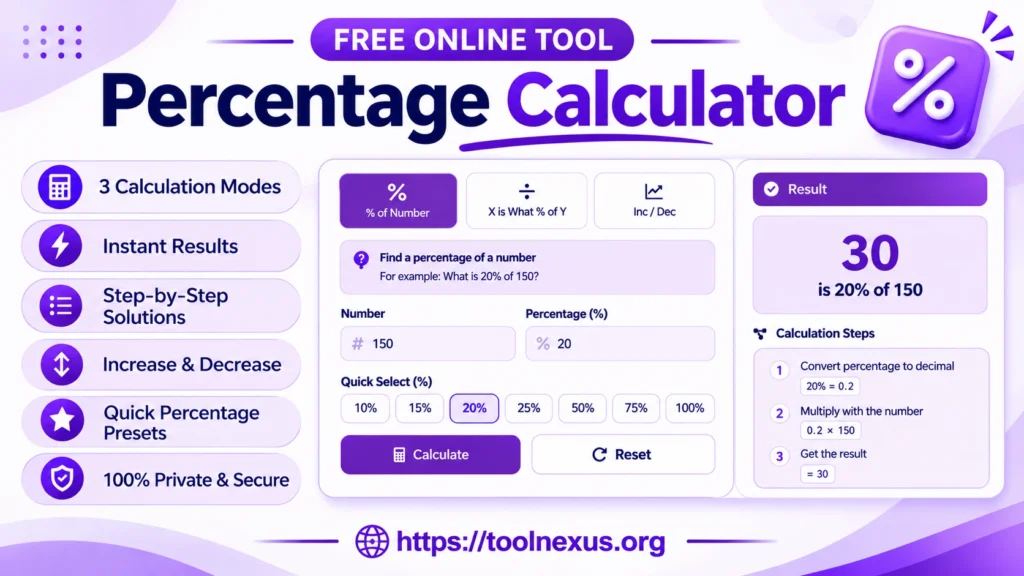
Our free percentage calculator does the work for you. Pick a tab, type two numbers, and read the answer. It also shows the steps, so you can see how the answer was found.
What Is a Percentage Calculator?
A percentage calculator is a small online tool that solves percent problems. You type in two numbers. The tool does the math and tells you the result in a short sentence. Some people call it a percent calculator. It is the same thing.
Where the Word “Percent” Comes From
The word has old Latin roots. “Per” means “for each,” and “centum” means “hundred.” So a percent is just a number out of one hundred. When you see 40%, read it as 40 out of every 100. The sign % is a short way to write that. You can read more about how percents work on Math Is Fun.
Where People Use It
- Students turn marks into a percent for forms and results.
- Shoppers check how much a sale really saves.
- Workers see how big a pay rise is.
- Shop owners compare this month’s sales with last month’s.
- Families look at how much a bill went up or down.
How to Use the Percentage Calculator
The tool has three tabs at the top. Pick the tab that matches your question. The boxes and the hint text change by themselves.
Find a Percent of a Number
Click the % of Number tab. Type your number in the first box. Type the percent in the second box. For example, enter 240 and 35, and you get 84.
Find What Percent One Number Is of Another
Click the X is What % of Y tab. Type the small part in the first box. Type the full amount in the second box. For example, enter 18 and 24, and you get 75%.
Find the Percent Increase or Decrease
Click the Inc / Dec tab. Type the old value in the first box. Type the new value in the second box. For example, enter 25000 and 27500, and you get a 10% increase. When the new value is lower, the big number shows a minus sign, and the line under it says “decrease.”
How to Calculate a Percentage by Hand
You do not need a tool for small sums. These three rules cover almost every case.
Find a Percentage of a Number
Divide the percent by 100. Then multiply the answer by your number. To find 15% of 360, work out 15 ÷ 100 = 0.15. Then 0.15 × 360 = 54.
Find What Percent One Number Is of Another
Divide the small number by the big number. Then multiply by 100. If you have 9 out of 36, then 9 ÷ 36 = 0.25, and 0.25 × 100 = 25%. The big number can never be zero.
Find the Percent Increase or Decrease
Take the new value and subtract the old value. Divide the result by the old value. Then multiply by 100. Going from 200 to 150 gives 150 − 200 = −50. Then −50 ÷ 200 = −0.25, which is a 25% fall.
Percentage Examples You Can Try
Shopping and Discounts
A bag costs 1,800 and the sale is 25% off. Use the first tab with 1800 and 25. The discount is 450. You pay 1,350.
A pair of shoes drops from 640 to 512. Use the third tab with 640 and 512. The price fell by 20%.
Tips and Service Charges
Your restaurant bill is 2,400 and you want to add a 5% tip. Use the first tab with 2400 and 5. The tip is 120, so the total is 2,520.
Business and Sales
A bakery bakes 45 loaves and sells 27 of them. Use the second tab with 27 and 45. That is 60% sold.
A shop sold goods worth 90,000 last month and 76,500 this month. Use the third tab with 90000 and 76500. Sales fell by 15%.
Marks Percentage Made Simple
Students use percentages more than anyone. Here is how to handle marks the right way.
Marks From Many Subjects
Add up all the marks you got. Add up all the total marks. Then divide the first sum by the second and multiply by 100. Say you got 38 out of 50, 62 out of 75, and 70 out of 100. You got 170 marks out of 225. That is 75.56%.
A Full Result Card
Many result cards print one grand total. Use that number. If your card says 745 out of 900, enter 745 and 900 in the second tab. The answer is 82.78%.
Do Not Average the Subject Percentages
This is the most common mistake. Say you got 15 out of 20 in one paper (75%) and 30 out of 100 in another (30%). If you add 75 and 30 and divide by two, you get 52.5%. That is wrong. The papers have different totals, so they count differently. Add the marks first: 45 out of 120 is 37.5%. Only average percentages when every paper has the same total.
Marks Needed for a Target
Say you want 70% of 800 marks. Use the first tab with 800 and 70. You need 560 marks. If you have 520 so far, you need 40 more.
Can a Percent Go Above 100 or Below Zero?
Yes to both. A percent goes above 100 when the part is bigger than the whole you compare it with. If you enter 130 as the part and 50 as the whole, the answer is 260%. A percent goes below zero when a value falls, as in the Inc / Dec tab. A drop shows up as a negative number.
Percent, Percentage Point and Per Thousand
These ideas look alike, but they are not the same.
- Percentage point is the plain gap between two percents. Going from 20% to 30% is a gain of 10 points. It is also a 50% rise, because 10 is half of 20.
- Per thousand means out of 1,000 instead of 100. So 5 per thousand is the same as 0.5%.
Key Features of Our Percentage Calculator
- Live answers. The result changes while you type. A short sentence under it explains what the number means.
- Quick buttons. In the first tab, tap 10%, 15%, 20%, 25%, 50%, 75% or 100% to fill the percent box.
- Step panel. Every tab shows three short lines that explain the math. It is great for homework.
- Sample numbers. Each tab starts with an example. The Reset button brings it back.
- Decimals. Use whole numbers or decimals. Answers show up to two decimal places.
- Any screen. The layout fits phones, tablets and computers.
Related Tools
Need more help with numbers? Try these free tools from ToolNexus.
- Sales Tax Calculator: Add tax to a price or remove it from a total.
- Age Calculator: Find your exact age from your date of birth.
You can also see every tool on the Explore Tools page.
Frequently Asked Questions
How can I find 10% of a number fast?
Move the decimal point one place to the left. So 10% of 470 is 47. Move it two places to get 1%, which is 4.7.
Can I type decimal numbers?
Yes. Both boxes take decimals. For example, 4.5% of 600 is 27. Long answers are cut to two places, so 33.3333 shows as 33.33.
What happens if I type zero?
Two cases cannot be solved. In the second tab, the whole amount cannot be zero. In the third tab, the old value cannot be zero. The tool shows a short error until you change the number.
How do I find a percent on a phone calculator?
Type the small number, press divide, type the big number, then press multiply and type 100. For 14 and 25, that is 14 ÷ 25 × 100 = 56%.
How do I add or take away a percent from a price?
Find the percent in the first tab. Then add it to the price, or subtract it. To add 12% to 1,500, the tool gives 180. So the new price is 1,680. To take it away, you get 1,320.
Is the calculator free, and are my numbers saved?
It is free, and you do not need an account. The math happens in your browser, so your numbers are only used to show the answer on your screen.