
Try CSS Minifier Tool and Compressor — Minify CSS Online Free Now
Click or drag your CSS file here
CSS Minifier: Minify and Beautify CSS Code Online
Need to minify CSS fast without installing anything? This online CSS minifier takes your CSS code, strips out the extra spaces, comments, and newlines, and hands you back a minified CSS file ready to drop into your site. It works for plain CSS, and it doubles as a JS minifier too, so JavaScript and CSS both get the same treatment in one place. Paste your code below, hit minify, and copy the minified output. No signup, no download, no catch.
What Is a CSS Minifier?
A CSS minifier is a tool that takes readable, indented CSS code and removes everything a browser does not actually need to render the page. That means whitespace, line breaks, comments, and sometimes even shortening color codes and merging duplicate rules. The result is a smaller CSS file that does exactly what the original did, just with fewer bytes.
Why does this matter? Because every byte of CSS has to travel from your server to the visitor’s browser before the page can paint anything. A bloated stylesheet with heavy indentation, long variable names, and stray comments adds up, especially on a big site with thousands of lines of CSS. Minification does not change what the code does. A CSS minifier just removes the human-readable padding that developers add for their own sanity while writing the file.
This specific CSS minifier is built to handle real-world CSS without breaking selectors or media queries, which is where a lot of quick-and-dirty minifiers fall apart. It runs right in your browser, so there is no upload delay and nothing gets stored on a server somewhere. If you have ever pasted CSS into a tool and gotten back garbled output with broken brackets, you will notice this CSS minifier is a lot more careful about that.
How to Use the CSS Minifier
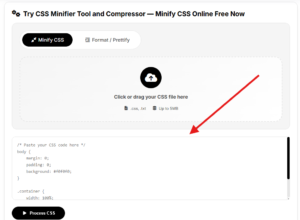
Step 1: Paste Your CSS Code
Copy the CSS from your stylesheet, your editor, or wherever it lives and paste it into the input box. It does not matter how messy or how neatly indented it is. The CSS minifier reads through the whole file and does not care about your formatting habits.
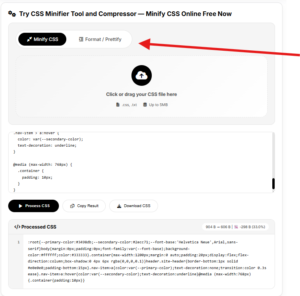
Step 2: Choose Minify or Beautify
Pick whether you want to minify CSS into a compact single-line file or run it the other way as a CSS beautifier to turn minified CSS back into something readable with proper indentation. Both directions use the same box, so you can go back and forth while debugging.
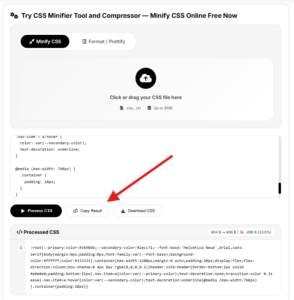
Step 3: Copy or Download the Result
Once the CSS minifier finishes processing, your output appears instantly. Copy the minified CSS straight to your clipboard or download it as a file and drop it into your project. That is the whole workflow—start to finish in under a minute.
CSS Minification Concepts This Tool Handles (and Why They Matter)
Understanding what CSS minification actually does helps you choose the right settings and avoid breaking your styles:
- Whitespace and comment removal: Minifiers strip spaces, tabs, newlines, and comments—all non-functional characters. This is safe for production but destructive: always keep the original source for future edits.
- Selector and media query preservation: A careful minifier does not alter selector specificity, pseudo-classes, media queries, or cascade order. This is where quick-and-dirty minifiers break layouts; verify selector behavior after minifying complex stylesheets.
- Color value shortening: Long hex codes are shortened where equivalent (
#ffffff→#fff), named colors may be used when shorter (#ff0000→red), andrgb()values may collapse where safe. These are byte savings with identical rendering. - Zero value optimization: Units are removed from zero values (
0px→0) because they are equivalent. Leading zeros in decimals are dropped (0.5→.5). Both are standard minification rules. - Duplicate rule merging: Identical declarations under matching selectors may be merged. This reduces bytes but changes rule order in the source—verify cascade-sensitive styles after minifying.
- Vendor prefixes: Older minifiers sometimes removed vendor prefixes. Modern ones preserve them, since autoprefixing is often handled separately. Do not rely on minification to fix or add prefixes.
- CSS variables: Custom properties (
--color-primary) are preserved; only their values are subject to minification. Do not rename variables to shorter names—it breaks code that depends on the public name. - Source maps: Production minification is often paired with a source map so browser DevTools can map minified lines back to the original source. Useful for debugging minified CSS in production.
- Minification vs. compression: Minification removes redundant characters at the source. Compression (Gzip, Brotli) reduces transfer size at the network layer. Combining both gives the smallest payload and fastest load times.
- Core Web Vitals impact: CSS is render-blocking by default. Smaller CSS files reduce First Contentful Paint (FCP) and Largest Contentful Paint (LCP) delays, directly improving page performance scores.
Key Features
Instant Online CSS Minification
There is no install, no extension, no command-line setup. This is a straightforward online CSS minifier that runs the moment you paste code in. Compare that to setting up a build tool or a GitHub dependency just to compress CSS, and it is obvious why many developers want something quick they can paste into for a one-off job.
Built-In CSS Beautifier
Minified CSS is a nightmare to read. If someone hands you a compressed file, or you pulled one down and need to debug it, the beautifier side of this tool unminifies it back into properly indented, readable CSS. It is the same tool doing both jobs, so you never need a second tab open for CSS unminify or CSS prettify.
JS Minifier Included
This page focuses on CSS, but the same minification engine also handles JavaScript minification. If your project has both CSS and JavaScript files that need compressing before deployment, you can run them through the matching JS minifier without switching tools. Handy for anyone building out a small static site who does not want a whole bundler just to shrink two files.
Manual CSS Optimization vs. This CSS Minifier
| Feature | Build Toolchain (PostCSS, cssnano) | This CSS Minifier |
|---|---|---|
| Setup required | npm install, config files | None—runs in the browser |
| Best for | Repeatable production builds | One-off files and quick tests |
| Beautify / unminify | Usually separate tool | Built into the same page |
| Privacy | Local or CI-based | Client-side, nothing uploaded |
| Speed for a single file | Slow—requires full build | Instant |
Why This CSS Minifier Works
Faster Page Load Times
Smaller CSS files mean the browser has less to download and parse before it can render your page. On a slow connection or a mobile network this difference is noticeable, and it is one of the easier wins for improving website performance without touching your actual design.
Cleaner Delivery Alongside Gzip and Cloudflare
Minifying CSS before it ever hits Gzip compression or a CDN like Cloudflare gives those systems less redundant text to work with. You still get compounding gains, since minification and compression solve different parts of the same problem—removing unnecessary characters versus encoding repeated patterns.
Fewer Accidental Bugs From Stray Code
Running your CSS through a minifier sometimes surfaces a bug you did not notice, like a stray bracket or an accidentally duplicated rule, because the parser has to make sense of the whole file to compress it. Not its main job, but a nice side effect.
Who Can Use It
Web Developers
Anyone building or maintaining a website can use this to shrink CSS and JavaScript files before pushing them live. It is fast enough to use on every deploy if you are not already running it through a build step, and it saves you from hand-editing whitespace out of a stylesheet.
SEO Professionals
Page speed factors into SEO rankings, and a developer might not always be the one flagging that a site’s CSS is bloated. SEO folks running site audits can use this tool to test how much a stylesheet could shrink and make the case for optimization work.
Students and Learners
If you are learning web development and want to see what a real minified CSS file looks like compared to your own code, running your CSS through this tool is a fast way to understand the difference between clean, readable code and shipped, optimized code.
Common Use Cases
Shipping a Static Site Without a Build Tool
Say you built a small static site by hand—just HTML, CSS, and a bit of JavaScript, no framework, no bundler. Before you push it live you want the CSS and JavaScript minified so pages load faster, but setting up a whole build pipeline for a five-page site feels like overkill. You paste your CSS and JS into the CSS minifier, minify both, and copy the output straight into your deployed files. Done in a few minutes, no dependency added to the project.
Cleaning Up a Client’s Legacy Stylesheet
You inherit a client site where the CSS file has years of comments, dead rules, and inconsistent indentation left behind by whoever touched it last. Rather than manually stripping it down, you run it through the beautifier first to actually read what is there, clean up the dead code, then minify the final version before it goes back into production.
Debugging a Minified File You Did Not Write
Someone hands you a production CSS file that is already minified—one long unreadable line—and you need to find a specific rule that is breaking a layout. You paste it into the beautifier side of this tool, get it back with proper indentation and line breaks, and now you can actually search through it and find the bug.
Data Sources, Accuracy, and Disclaimers
CSS minification follows standard CSS minification semantics—whitespace and comment removal, safe value shortening, and rule merging—as implemented by the browser-based minifier engine. Minification is not reversible: comments and original formatting cannot be recovered, so always keep a copy of the source. This tool provides minification for informational and productivity purposes. For production deployment, combine minification with server-side compression (Gzip or Brotli), a CDN, and a CI-based build pipeline (PostCSS or cssnano) for repeatable results. Always test minified output in a staging environment before deploying to production, especially for stylesheets that rely on cascade order or vendor-specific hacks.
Related Tools
If you are minifying CSS, there is a good chance you need the JS Minifier/Formatter too, since most projects ship both together. Once your files are compressed, check the broader Formatting Tools category for more code cleanup utilities. And if your workflow includes other file types beyond code, browse the full tools hub for everything else ToolNexus offers. For any custom development or technical support, feel free to contact us today.
External Resources
For authoritative information on CSS minification and performance:
- MDN — CSS — Complete reference for CSS syntax, selectors, and properties.
- web.dev — Minify CSS — Google’s guidance on CSS minification for performance.
- web.dev — Largest Contentful Paint — How render-blocking CSS affects Core Web Vitals.
- cssnano — Industry-standard CSS minifier for build pipelines.
Frequently Asked Questions
What is a CSS minifier and how does it work?
A CSS minifier is a web optimization tool that removes unnecessary whitespace, line breaks, indentations, and comments from stylesheet code without altering its visual styling or execution. It reduces overall file weight, allowing browsers to download and render stylesheets faster.
Does minifying CSS break website design or styling?
No. CSS minification does not change selectors, declarations, media queries, or rule hierarchy. Because the CSS minifier only strips non-functional characters like formatting spaces and comments, your website layout and design render identically before and after minification.
How much does minifying CSS improve website speed?
Minifying CSS typically reduces stylesheet file sizes by 20% to 50%, directly cutting down render-blocking resource delays. This improves key Google Core Web Vitals metrics, specifically Largest Contentful Paint (LCP) and First Contentful Paint (FCP).
Can I unminify or format minified CSS back to readable code?
Yes. Use the built-in CSS Beautifier / Formatter mode to restore standard indentation, line breaks, and readable hierarchy. Original developer comments cannot be recovered, but the code is neatly organized for debugging and editing.
What is the difference between CSS minification and Gzip compression?
CSS minification removes unnecessary characters from the source code itself, whereas Gzip or Brotli compresses the file during server-to-browser network transit. Using both methods together provides optimal performance by reducing file size at the code level and the transport level.
Can this tool also minify JavaScript code?
Yes. The tool includes a dual-purpose engine that compresses both JavaScript (.js) and CSS (.css) files in the same interface without requiring external software or build tools.
Is it safe to paste private or production code into this online CSS minifier?
Yes. Processing happens directly within your web browser client-side, meaning your stylesheets and code snippets are never stored, saved, or shared on external servers.
Why should I minify CSS if my hosting uses Cloudflare CDN?
Minifying CSS before delivering it to Cloudflare ensures cleaner, smaller origin files for CDN caching, reducing bandwidth usage and maximizing edge cache efficiency across global servers.
How do I use this free online CSS minifier tool?
Paste your stylesheet into the input editor, select Minify, and instantly copy the compact code or download your minified .min.css file directly to your project.
Does CSS minification affect SEO rankings?
Yes. CSS minification indirectly boosts SEO rankings by reducing page load times and eliminating render-blocking stylesheets, which positively impacts Google’s Core Web Vitals evaluation.