
PDF to Word Converter
Click or drag your PDF file here
Max: 50MB | 100% Private
PDF to Word Converter: Convert PDF to Editable DOCX Online
Need to convert PDF to Word without touching a single piece of software? This PDF to Word tool takes any PDF file and turns it into a Word document you can actually edit, right in your browser. Drag and drop your PDF, wait a few seconds, and download a DOCX file that opens straight in Microsoft Word or Google Docs. It is a free PDF to Word converter online—no account, no watermark, no catch.
What Is a PDF to Word Converter?
A PDF to Word converter is exactly what it sounds like. It takes a PDF and rebuilds it as a Word file so you can actually change the text instead of staring at a locked document wishing you could fix one typo. PDF files are great for sharing because they look the same everywhere. That is also their biggest weakness. You cannot easily edit a PDF, and if you have ever tried copying text out of one and pasting it somewhere else, you know the formatting usually falls apart on the way.
That is the problem this tool exists to solve. The PDF to Word converter reads the PDF file, works out the layout, the fonts, the spacing, and the tables if there are any, and converts PDF to Word in a way that keeps things looking close to the original. You get a DOCX file back that opens in any word processor and lets you edit like it was never a PDF in the first place.
What makes this specific PDF to Word tool worth using over some clunky desktop program is simple. It runs directly in your browser. No install, no license key, no waiting for a download to finish before you can even open the app. Upload the PDF, get your Word document online, done. And because it is browser-based, it works the same whether you are on a Mac, a Windows laptop, or even a phone.
How to Use the PDF to Word Tool
Converting a PDF to a Word document here takes about three steps. Nothing hidden, nothing you need to figure out on your own.
Step 1 – Upload Your PDF
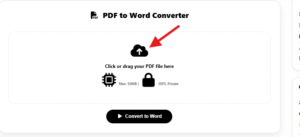
Click the upload area or drag and drop your PDF straight onto the page. The PDF to Word converter accepts standard PDF files, including scanned PDF pages, so you do not need to sort your documents beforehand. On mobile, tap to browse your files and select the PDF you want converted. There is no size gatekeeping wall thrown up before you even start.
Step 2 – Let the Tool Convert It

Once the PDF is uploaded, the tool gets to work. It reads through the document, pulls apart the text, images, and layout, and rebuilds all of it as an editable Word document. If the PDF is a scanned image rather than real text, OCR kicks in automatically to recognize the letters on the page. This step usually takes seconds for a normal document and a bit longer for something long or image-heavy.
Step 3 – Download Your Word File
When the conversion finishes, your converted Word file is ready to download straight away. Click download, and the DOCX file lands in your downloads folder like any other file. Open it in Word, Google Docs, or whatever word processor you use, and start editing. No email required, no waiting for a link, nothing sitting on a server pretending it needs “processing time.”
PDF to Word Concepts This Converter Handles (and Why They Matter)
Understanding how PDF-to-Word conversion works helps you know what to expect and how to prepare files for the best results:
- Text-based vs. scanned PDFs: Text-based PDFs contain selectable text and convert with high accuracy. Scanned PDFs are images of pages and require OCR to extract text. This tool handles both, applying OCR automatically when the PDF has no extractable text layer.
- OCR accuracy factors: OCR works best on clean, high-resolution scans with standard fonts. Skewed pages, low DPI, handwriting, and decorative fonts reduce accuracy. Verify converted text carefully on scanned documents.
- Layout preservation: Paragraph breaks, tables, multi-column layouts, headers, footers, and embedded images are preserved where possible. Complex multi-column or magazine-style layouts may require manual tidying after conversion.
- Font substitution: If the original PDF uses a font not available on your system, Word substitutes a similar font. The layout may shift slightly as a result. Verify before publishing.
- Vector graphics and shapes: Simple shapes and diagrams usually survive conversion. Complex vector illustrations or CAD drawings may not translate cleanly and are often embedded as images instead.
- Forms and interactive elements: Fillable PDF forms lose their interactivity after conversion. Form fields become static text or form controls in Word that may require reconfiguration.
- Hyperlinks and bookmarks: URL hyperlinks in the PDF are typically preserved as clickable links. Internal bookmarks and PDF navigation may not carry over—recreate them in Word if needed.
- Password-protected PDFs: Encrypted PDFs must be unlocked before conversion. Remove the password in your PDF reader first, then upload.
- File size and page count: Conversion time scales with document length and image complexity. Very long documents (100+ pages) or image-heavy scans take longer than simple text pages.
- Privacy and processing: Browser-based converters process files locally on your device. Server-based converters upload files to a remote service. This tool runs in your browser, so your PDF never leaves your device.
Key Features
OCR for Scanned Pages
Not every PDF is made of real, selectable text. Plenty are just scanned images of paper documents—old contracts, printed forms, whatever someone ran through a scanner years ago. This PDF to Word tool uses optical character recognition to actually read the text off a scanned PDF and turn it into real, editable words instead of leaving you with a picture pretending to be a document. It is not flawless on messy scans, but for most typed pages it holds up well.
Layout and Format Preservation
Formatting is usually where PDF to Word conversions fall apart, and it is the thing people worry about most. This tool does a solid job of preserving structure, paragraph breaks, basic tables, and general layout so the Word document does not come out looking like a jumbled mess. Complex layouts may need a little manual tidying afterward—that is true of any converter—but the bones of the document stay intact.
No Software, No Sign-Up
There is nothing to install. No account to create, no email to hand over, no trial period that quietly turns into a subscription. You open the page, use the tool, and leave. That is it. It is a genuinely free tool built to just work, not a lead magnet dressed up as a converter.
Manual Copy-Paste vs. This PDF to Word Converter
| Feature | Manual Copy-Paste from PDF | This PDF to Word Converter |
|---|---|---|
| Layout preservation | Falls apart completely | Preserves paragraphs, tables, and basic structure |
| Scanned PDF support | Not possible without OCR | OCR applied automatically |
| Speed for long documents | Hours of retyping | Seconds to minutes |
| Editable output | Manual reconstruction required | Ready-to-edit DOCX |
| Privacy | Local but time-consuming | Client-side, no upload required |
Why This PDF to Word Tool Works
Saves Time on Retyping
Retyping a whole document by hand because it is stuck in PDF form is nobody’s idea of a good afternoon. Converting it instead turns a task that could eat an hour into something that takes under a minute.
Works on Any Device
Because the tool runs in your browser, it does not care whether you are on a work laptop, your own Mac, or a tablet you grabbed on the way out the door. No app store, no iOS-specific version needed—just a browser and a PDF.
Free to Use
There is no fee attached to converting your PDF to Word here. No premium tier hiding the actual conversion button, no page limit that only reveals itself after you have already uploaded your file.
No File Left Behind on a Server
Nobody wants their contract or their personal report sitting on some random server indefinitely. This tool is built around a simple, browser-based process—you upload, convert, download, and move on.
Who Can Use It
Students and Researchers
Anyone digging through scanned PDF textbooks, old journal articles, or lecture notes handed out as PDF files benefits from turning that material into an editable Word document. It is a lot easier to highlight, annotate, and quote from a DOCX than to fight with a locked PDF.
Office and Admin Staff
Contracts, reports, forms—they all show up as PDF files in daily office work, and someone always needs to update or reformat one of them. Rather than retyping a whole report from scratch, converting it to Word first saves the actual editing for the parts that matter.
Freelancers and Small Business Owners
Clients send PDFs. That is just how it goes. When you need to tweak a proposal a client sent over, or pull specific sections out of a PDF report for reuse, converting to Word first gets you there fast without extra software costs eating into a small budget.
Anyone on a Phone or Tablet
Since the PDF to Word tool works directly in a browser, someone converting a PDF to Word document online from their phone gets the same result as someone at a desktop. Handy when a PDF lands in your inbox mid-commute and you need it editable before a meeting.
Common Use Cases
Editing a Contract Sent as a PDF
Someone emails over a contract as a PDF, and of course there is a clause that needs adjusting before anyone signs it. Instead of retyping the whole thing or hunting for the original Word doc that may not even exist anymore, you upload the PDF, convert it, and edit the exact section that needs fixing. Ten minutes later it is back in someone’s inbox, changes and all.
Reworking an Old Scanned Report
A report from a few years back only exists as a scanned PDF sitting in a folder somewhere. Now it needs an update for a new project. Rather than starting over, running it through OCR conversion pulls the text out as an editable Word file, and from there it is just a matter of updating numbers and adding new sections instead of rebuilding the whole document from nothing.
Pulling Text From a PDF for a New Document
Sometimes you do not need the whole PDF, just a section—maybe a few paragraphs to build into a new report or proposal. Converting the full PDF to Word first makes it simple to copy exactly what is needed with formatting that actually holds together, instead of pasting a wall of broken text from a PDF viewer.
Data Sources, Accuracy, and Disclaimers
Conversion follows standard PDF-to-DOCX transformation conventions and modern OCR models. OCR and layout reconstruction produce strong results for typical text-based and scanned documents, but can introduce errors on low-resolution scans, handwritten text, complex tables, or decorative fonts. This tool provides conversion for informational and productivity purposes. Always review converted documents carefully before signing, publishing, or using them in legal, medical, or financial contexts. Confirm the copyright and licensing status of any document before converting, editing, or distributing it.
Related Tools
If you are working with PDF files regularly, a few other PDF Tools on the site might come in handy alongside this converter. For images pulled out of a converted document, the Image Converter helps switch between formats without extra software. If you are cleaning up code snippets that ended up in a document, the JS Minifier/Formatter and CSS Minifier/Formatter are worth a look too.
External Resources
For authoritative information on PDF, DOCX, and OCR standards:
- Wikipedia — PDF — History and structure of the Portable Document Format.
- Wikipedia — Office Open XML — The standard format behind .docx files.
- Microsoft — Word — The official home of Microsoft Word.
- Wikipedia — Optical Character Recognition — Background on how OCR extracts text from images.
Frequently Asked Questions
How do I convert a PDF to an editable Word document online for free?
Upload your PDF file to the converter, wait a few seconds for the document to process, and click download to save the fully editable .docx file to your device. No sign-up or software installation is required.
Will converting a PDF to Word preserve my original layout and formatting?
Yes. The conversion engine preserves paragraphs, tables, fonts, and structural layouts so your Word document closely matches the original PDF without breaking page structure. Complex layouts may need minor tidying after conversion.
Can I convert scanned PDF pages into editable Word text?
Yes. Built-in Optical Character Recognition (OCR) automatically scans image-based pages and converts printed text into real, selectable, and editable words in Microsoft Word. Verify accuracy on low-resolution or handwritten scans.
What file format do I get after converting my PDF?
You receive a standard .docx file that opens directly in Microsoft Word, Google Docs, LibreOffice, and any other standard word processing application.
Is my data and document privacy safe when using this tool?
Yes. All document processing runs securely in your browser, and files are not stored indefinitely on external servers, keeping sensitive documents and contracts safe.
Can I convert PDF files to Word on mobile devices like iPhone and Android?
Yes. This tool works directly in any mobile web browser, allowing you to upload PDF files and download DOCX documents without installing an app.
How do I edit a PDF without paying for expensive PDF software?
Convert your locked PDF file into a standard Word document using this free online tool, make your edits directly in Microsoft Word or Google Docs, and save or export it back to PDF when finished.
Can I convert scanned contracts and multi-page reports to Word?
Yes. The converter processes both short contracts and long multi-page reports, using OCR where needed to pull text and formatting cleanly from scanned documents.
Do I need an account or email address to download my converted Word file?
No. You do not need to register, provide an email address, or enter payment details to convert and download your Word documents.
What should I do if a converted document has layout or OCR errors?
Review the converted DOCX carefully, especially tables, headers, and any text pulled from scanned pages. For OCR errors, correct the text directly in Word. For layout issues, use Word’s table and paragraph tools to adjust. For critical documents, consider a higher-resolution scan and re-convert.