
Everything You Need to Know
Get precise age calculations instantly with our easy-to-use tool.
Exact Age
Get your age in years, months, and days accurately.
Real Month Lengths
Counts true days in each month, including leap years.
Next Birthday Countdown
Know exactly how many days are left until your next birthday.
100% Private
Calculations happen in your browser. No data is saved.
Age Calculator
Know your exact age in a blink
Introduction: What Is the Age Calculator?
Most of us know our age in years. We say “I am 26,” and that is enough for a chat with a friend. But life often asks for more. A school may want your exact age on the first day of class. A job form may ask for your age in years, months and days. A visa office, a sports club, an insurance company and a doctor can all ask the same thing. Counting this by hand is slow, and one small mistake can mean a rejected form or a long wait.
The ToolNexus Age Calculator solves this in a few seconds. You enter your date of birth, press one button, and the tool tells you exactly how old you are today. Not just “26,” but how many years, months and days have passed since the day you were born. It also gives you a few fun facts about your birth date along the way.
The tool is made for everyone. Students can check if they meet an age limit. Parents can follow a baby’s age month by month. Adults can fill in forms without worry, and curious people can find out how long they have been alive. If you can pick a date on a calendar, you can use this tool.
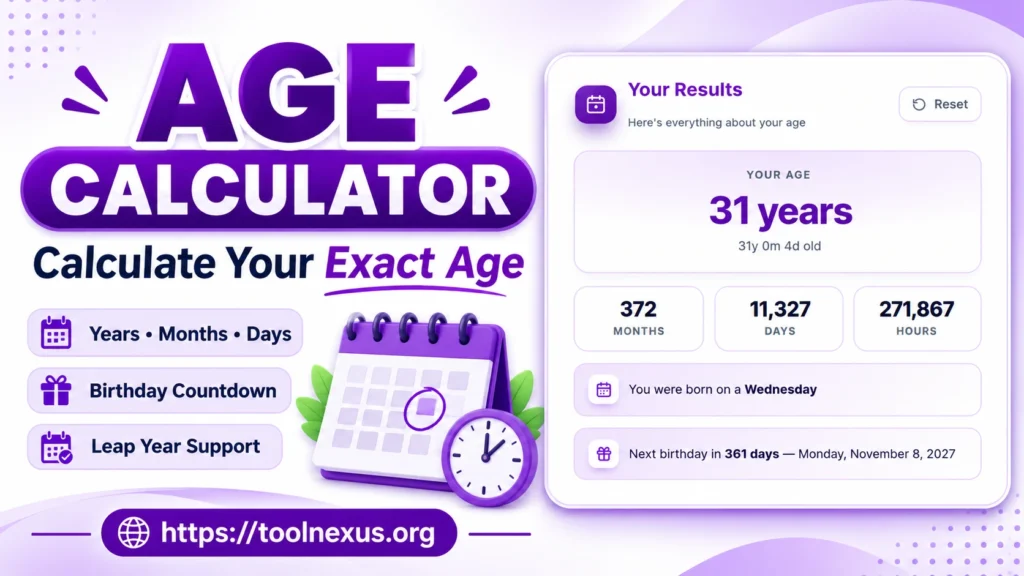
How to Use the Age Calculator
Using the calculator takes less than ten seconds, and you do not need any special skills. Follow these four steps:
- Select your date of birth. Click the date field and pick your birth date from the calendar.
- Click “Calculate My Age.” Your result card appears right away.
- Read your results. Everything is shown together in one place, so there is nothing to scroll through or open.
- Press “Reset.” This clears the form so you can start again with a new date.
Key Features of the Age Calculator
- Age in years, months and days: This is the main answer. It is the format that most forms and records ask for.
- Total months, days and hours lived: These show your age as big single numbers. They are fun to share, and they help you celebrate special numbers, like your 10,000th day.
- Day of the week you were born: Find out if you arrived on a Monday morning or a Saturday night. It makes a nice fact for birthday posts and family stories.
- Next birthday countdown: The tool shows how many days are left, along with the date and weekday of your next birthday. This helps you plan a party, buy a gift or send invitations on time. If today is your birthday, you get a special message.
- Leap year support: A leap year is a year when February has 29 days. It comes every four years, except for century years that cannot be divided by 400. This simple guide on Time and Date lists which years count. So 1900 was not a leap year, but 2000 was. People born on February 29 get correct results, and so does their birthday countdown.
- Real month lengths: Months can have 28, 29, 30 or 31 days. The calculator counts the true number of days in each month instead of using rough averages, so your result is never off by a day.
- Calendar date, not time zone: Time zones are the different clock times used around the world. The tool ignores them and uses exactly the date you type, so a birth close to midnight cannot change your result.
- Clear result card: Each number has a simple label, so you always know what you are looking at. There is no confusing short form or hard word to figure out.
- Easy date picker: You choose your date from a calendar instead of typing it by hand. This helps you avoid typing mistakes.
- Privacy-first design: Everything is worked out inside your own browser. Your date of birth is never saved, recorded or sent anywhere.
- Works on every device: The page adjusts to the size of your screen, so it feels comfortable on a phone, a tablet or a computer.
- Free, with no signup or download: Open the page, enter a date and get your answer. There is no account to make and nothing to install.
Purpose Behind Creating This Tool
Many online age tools do only the basics. They take one year away from another and skip the small details that make counting age tricky. The answer can end up a few days wrong, and that matters when an application or a record depends on the exact number.
A few days can decide a lot. Exam forms, driving licences, voting lists and retirement plans often use a fixed cut-off date. If your age is counted wrongly, you may be told you are too young or too old when you are not.
We wanted to fix this. Our first goal was a tool that people can trust for serious paperwork. Our second goal was to make it simple enough that anyone, from a school student to a grandparent, can use it without help. Our third goal was to keep it light, so that checking your age can also be a small moment of fun.
This tool is part of ToolNexus, a growing collection of online tools built to save people time. It sits alongside calculators such as our Percentage Calculator and Global Sales Tax Calculator. We keep each tool focused on one job and try to do that job well. We also believe that tools should be written in plain words, so nobody has to open another tab to understand what they are reading.
We are still improving. If you have an idea that would make this calculator better, please tell us through our Contact Us page. Your feedback helps us decide what to build and fix next.
Frequently Asked Questions (FAQs)
Can I calculate someone else’s age?
Yes. Enter any date of birth, whether it belongs to a family member, a friend or a famous person from history.
What is the difference between total days and age in days?
Age in days is the number of days left over after full years and months are counted. For example, in “2 years, 3 months and 15 days,” the 15 is the age in days. Total days is every single day you have lived since you were born.
Why do some places count age in years and others in months and days?
The law usually counts age in full years, so you become 18 on your 18th birthday. Doctors often use months and days, especially for babies and small children, because they grow and change so quickly.
Does it count age the way my country does?
The tool counts age the Western way, using the standard Gregorian calendar. In some East Asian countries, a baby is called one year old at birth. That method gives a different number, so keep this in mind if your form follows it.
Can I find my age on a future date?
No. The calculator measures your age up to today only. This also means your result will change from day to day.
Can I use it for very old dates?
Yes, any past date is accepted. For very old family records, check which calendar was used when the date was written down. Dates from long ago may need to be changed to the modern calendar first.
Can I rely on the result for legal, medical or visa decisions?
The result is exact for the date you enter, but it is meant for general information. For any official decision, always check your age against your official papers or ask the office that is dealing with your case.
Can I compare the ages of two people?
Yes. Enter the first person’s date of birth, note the result, press Reset and do the same for the second person. Then you can see who is older and by how much.
What if I do not know the exact date of birth?
The tool needs a full date, with the day, month and year. Please check a birth certificate or an ID card first, because a guessed date will give a guessed answer.
Is it simple enough for children to use?
Yes. A child can use it with a little help from an adult, and it is a fun way to teach kids about calendars, months and birthdays.